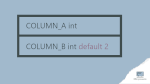
It is way simpler to drop a default constraint if you know its name. But in real life, we often create a column with a default value without giving it a custom name. It works well until we change our mind and want to change the default or even drop it. Then the real problem begins. How to drop default constraint without knowing its name in SQL Server?
 Each SQL Server database administrator and database developer has a set of scripts that should always be somewhere close. One of them is the one that kills a bunch of connections to a database. It can be a group of all connections, those made by a particular login or the ones using a specific database. No matter what actual conditions are, killing dozens or hundreds connections manually is not fun. Here are provide an SQL script that can be easily customized to cover a specific need. The below version destroys all non-background connections to a database called MyDatabase.
 SQL Server has a few functions that allow calculating a hash from a single value or multiple values. They could be very useful if they worked reliably. Unfortunately, they do not. This article shows how to use CHECKSUM and BINARY_CHECKSUM functions and why you should not rely on them. And I do not only mean the collision probability!
 When using SQL Server you may have an impression that not everything works exactly how you would expect. One of those things may be a view that does not contain a column that you added to the source table. In this article I will explain you why it works like that and how to refresh columns in the view.